Why this matters
Adding an AI model to a website takes an afternoon. Making it safe to leave running when nobody is watching takes much longer. A model can be asked things you did not plan for, it costs money on every call, and it can state something false in a confident voice. If the only protection is a polite instruction in the prompt, the first unusual visitor finds the gap.
This chapter uses a real example: the design of a private AI tutor for law students that is still being tested and is not open to the public. The decisions below come from its design log. They apply to any AI feature, whatever the subject.
What you'll learn
Why most of the protection should be plain code around the model, the order in which a message is checked, how limits and a monthly budget work, what an anonymous log can and cannot hold, and three real bugs found before launch.
Put the protection in code, not only in the prompt
A prompt is a request. Code is a rule. The tutor's main protections are all code that runs before or after the model:
- an advice check, which refuses requests for personal legal advice;
- a subject check, which redirects questions that are off-topic and names the current subject in the reply;
- a citation filter, which removes any court case that is not on a verified list.
This also decides where you test. The team tested in a private lab on the site, not in a model playground, because a playground sees only the prompt. A pass there proves little about the checks that sit around the model.
The order matters
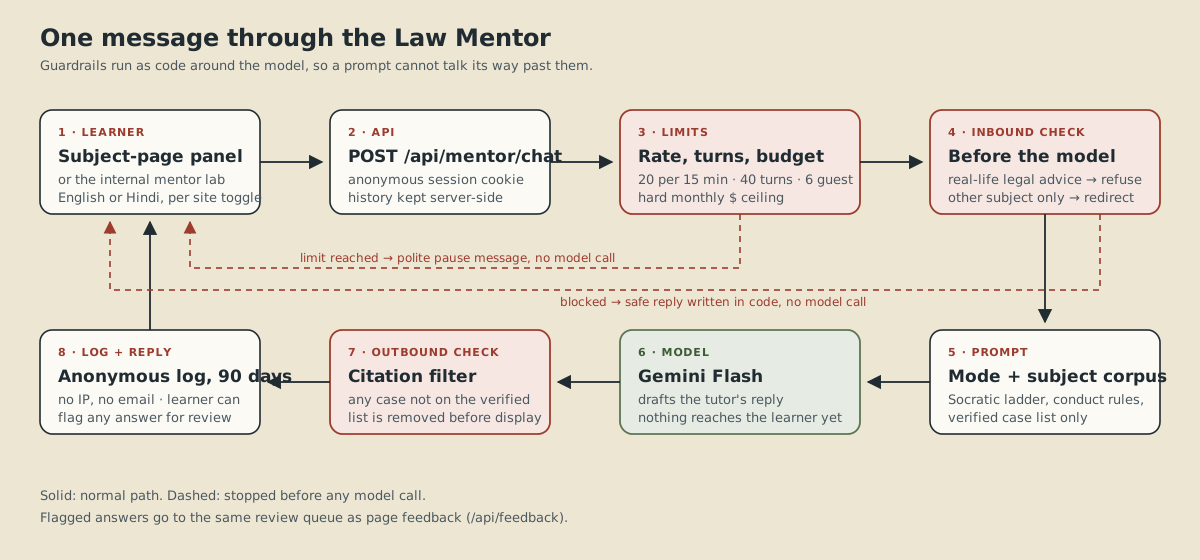
Every message goes through the same steps, in this order:
- Limits. Is this visitor over their rate limit, over the conversation cap, or has the month's budget run out?
- Inbound checks. Is this advice, or off-topic?
- Prompt. Build the instructions for this subject and mode.
- Model. Make the call.
- Outbound check. Remove any case that is not on the verified list.
- Anonymous log. Save the turn.
- Reply.
The point of the order is that a blocked message never reaches the model. A refused request costs nothing, and a trick in the wording of the question cannot change the answer, because the refusal is written in code, not generated.
Limits that protect people and the budget
The design sets these values, all adjustable through environment variables, so changing a limit does not mean editing code:
- 20 messages per 15 minutes per visitor address.
- 40 turns per conversation.
- 6 turns before a visitor must sign in; full use after sign-in.
- A hard ceiling of $5 a month. When it is reached, the tutor pauses and makes no model calls at all.
The last one is the most important. A warning email can be missed over a weekend. A ceiling that switches the feature off cannot be missed, and the worst case is a known number you chose in advance.
Be wrong in the safe direction
The citation filter shows a design principle worth copying. The tutor may only cite cases on a verified list. If the filter wrongly removes a real case, the student loses a little. If it lets a made-up case through, the student may rely on something false and stop trusting the tool. When a check must sometimes be wrong, choose the mistake that costs less.
The log records one known limit: a real case name with a lower-case word to the left of "v." (for example "Hammersmith and City Railway Co. v. Brand") can be removed by mistake. The team chose to accept this and watch whether it matters in testing.
Three real bugs, found before launch
- A budget of $25, not $5. The value in the code did not match the decision. Lesson: after you decide a limit, read the number actually in the code. It was caught before launch, when the cost of the mistake was still zero.
- A fake case that got through. The first version of the citation filter accepted "Nagendra Rao & Co. v. State of Kerala", an invented name, because a fragment of it matched a real case. It also missed "vs." and the Hindi word "बनाम" ("versus"). The second version needs an exact or leading-truncation match and understands those variants. Lesson: test your filter with fake inputs, not only real ones.
- A hard-coded subject. The off-topic reply said "Torts" even when the student was studying another subject. Lesson: any text that names something specific should be filled in from the current state, not typed in.
Logs: keep what you need, and say so
The tutor keeps conversation logs so mistakes can be found and fixed. The privacy rules around them are part of the design:
- an anonymous session ID, with no IP address and no email in the log;
- logs deleted automatically after 90 days;
- a one-line notice shown under the chat panel;
- billing enabled before launch, so students' messages are not sent on free-tier terms.
A "Flag this answer" button feeds the site's existing feedback queue, which closes the loop: a visitor who spots a wrong answer can tell you.
Try it yourself
Pick any feature you could put behind a limit, such as a contact form. Write down: (1) the most one visitor should be able to do in 15 minutes, (2) the most the whole feature should be able to cost in a month, (3) what happens when each is reached, and (4) what you would store in a log and what you would deliberately leave out.
What's next
Limits and logs are only useful if you can see them. Read Monitoring: Metrics, Logs and Traces. For keeping the model's key out of your code, read Secrets Management: Don't Commit Passwords. The scripts that installed these checks follow the habits in Writing Idempotent Deployment Scripts.
Continue learning
Secrets Management: Don't Commit That Password
Practical credential hygiene for real projects — why secrets don't belong in source control, how .gitignore and environment variables actually protect you (and where they don't), and what to do if a secret is committed by mistake.
Monitoring 101: Metrics, Logs, and Traces
The three pillars of observability explained plainly — what metrics, logs, and traces each tell you, and which one to reach for first depending on the question you're actually asking.
Writing Idempotent Deployment Scripts
What idempotent actually means for a deployment or automation script, why it matters when a script might be run twice by accident, and concrete patterns for writing scripts that are safe to re-run.